
New Blog Design
FABULOUS INDEED! That's how we feel about our spankin' new blog design by Tenille from The Cutest Blog on the Block!
Just a week ago, I was fortunate to find The Cutest Block on the Block's custom design website... the rest is history!
I cannot say enough how wonderful it was to work with Tenille from The Cutest
Blog on the Block! Her design was just what we were looking for—we LOVE
everything about it! Communication was a breeze—timely, helpful, and friendly.
Not to mention, she was fast! I filled out the order form at the end of the
week, heard back over the weekend that she had already started, and our blog was
up an running by Wednesday night. Highly recommended!
Gynzy!
What a great site! A fellow teaching mate found Gynzy and passed on her find. Gynzy is FULL of SmartBoard interactive lessons, activities, tools, organizers, and games. It's worth the time to check out. You can try it for free! I am planning on subscribing for the next school year...

Storybook Maker App
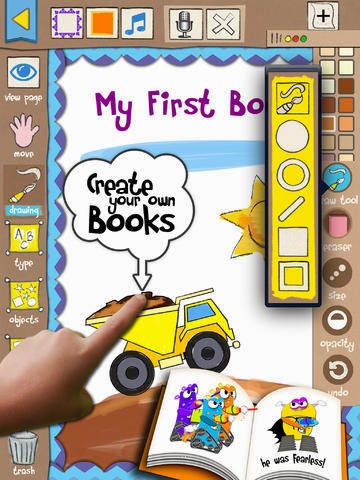
Uugh! How I came upon this find was not the most fun! I found a storybook making app for my second graders to use at the end of last year, had it approved to be installed on our iPads, it was installed, then I asked for it to be updated this week. Unfortunately, the app was not what it was before the update--no text editing. Not a good thing for second graders! Well, to make a bit of a long story short, our district's tech coordinator helped me find a fabulous app in a flash--Storybook Maker. It's user friendly, has many design options, full editing options, and more! I have had great fun experimenting with the app, and I can't wait to get started using it with my students to publish their nonfiction animal books. Would love to know if anyone out there has used this app with their students...

Adobe Illustrator Tutorial Find!

I learn something new every day!! Found this super-easy tutorial for creating a white border around text on YouTube--Adobe Illustrator Tutorial--Object Expand Tool. After getting our new blog design, I wanted to be able to create some linky buttons to complement the design. Jumped on line and this was the first tutorial I clicked on. With this tutorial, I was on my way to creating our new Fabulous Finds Friday link logo. Love this look!
Why not link up your fabulous finds? Learn more about our Fabulous Finds Friday linky by clicking here. Don't have a blog? Please feel free to share one of your fabulous finds in a comment.
Enjoy your Friday!

